Online Urdu Keyboard – Free Urdu Typing Tool

Type Urdu online with a free phonetic Urdu keyboard. Click the keys or use your own keyboard, then copy the text anywhere.

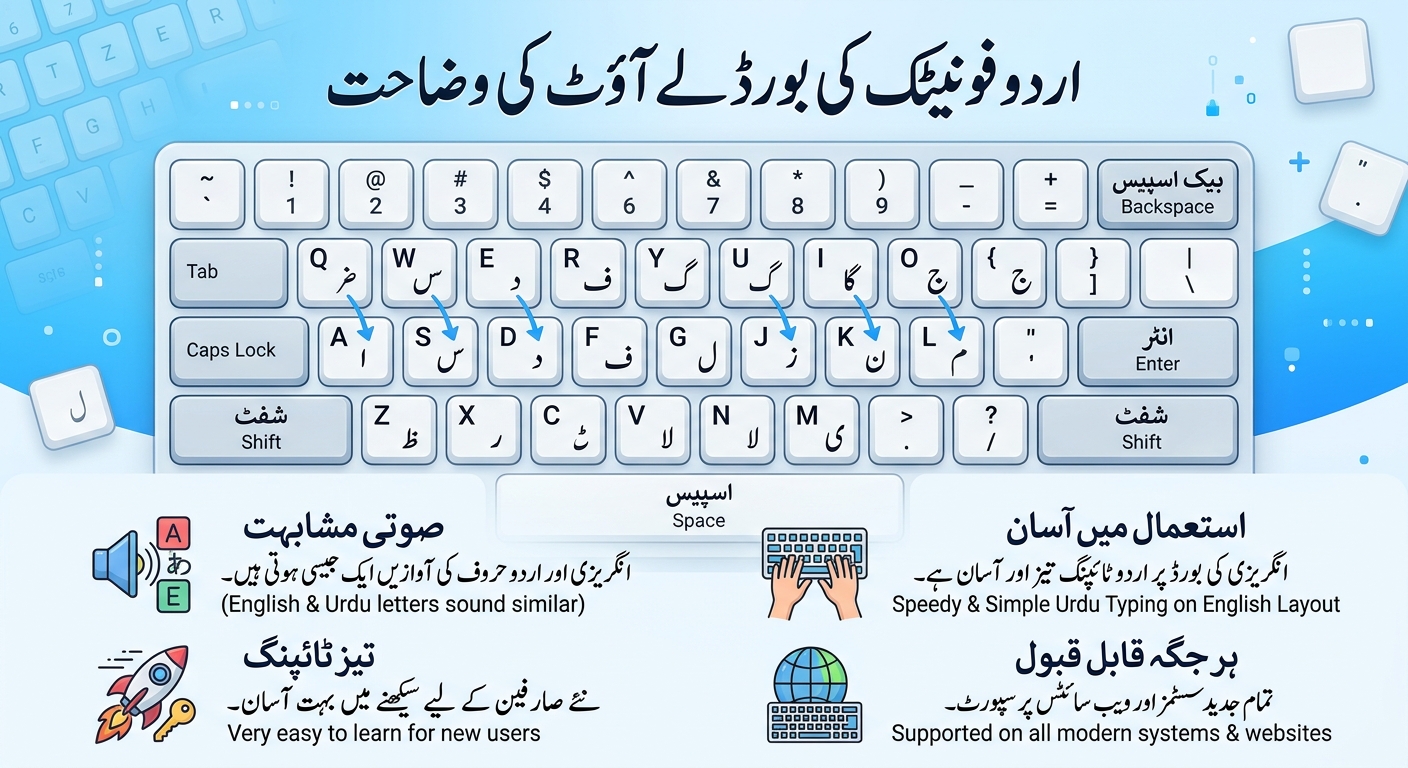
Each key shows the Urdu letter it types in large type, the letter you get with Shift in small type at the top, and the English key at the bottom left. The layout follows the familiar phonetic Urdu keyboard, so t gives ت, Shift + t gives ٹ, h gives ھ and Shift + h gives ح.

About this tool

This online Urdu keyboard lets you write Urdu online in any browser, with no software, no language pack and no sign-up. It follows the phonetic layout that many Urdu typists already know from InPage, so each English key types the Urdu letter that sounds like it: p gives پ, k gives ک, m gives م and s gives س.

The extra Urdu letters sit on the Shift layer, just as on a real keyboard. Shift + t types ٹ, Shift + d types ڈ, Shift + r types ڑ, Shift + n types ں, Shift + h types ح and Shift + s types ص. The picture of the keyboard on the page shows both letters on every key, so you can learn the layout as you type. The vowel marks (zabar, zer, pesh, shadda and jazm) are on the Shift layer too.

You can click the keys with a mouse or finger, or tick the option to type on your normal computer keyboard. The text is standard Unicode Urdu, so you can paste it into WhatsApp, Facebook, Word, Google Docs, an email or a website form and it displays correctly. You can also download it as a text file, change the font style and size, and switch between English and Urdu digits.

Everything runs in your browser. What you type is not sent to our servers and is not saved, so closing the page clears it. For the opposite job, see our Urdu to Roman Urdu converter.
How to use

  1. Click the letters on the on-screen keyboard to type in the box above it. Click Shift first (or hold Shift on your keyboard) to reach the second letter on a key.
  2. Or tick Type Urdu with my computer keyboard and type normally. Use the small English letter on each key as your guide, for example a = ا, b = ب, j = ج, and Shift + j = ض.
  3. Your keyboard's comma, full stop, semicolon and question mark type the Urdu forms (، ۔ ؛ ؟). The apostrophe key types a Latin full stop.
  4. Choose the Nastaliq font for the classic Urdu look, and use A+ and A− to change the size.
  5. Click Copy text to paste it anywhere, or Download .txt to save it.

On a phone or tablet, tick Use the on-screen keyboard only so your phone's own keyboard does not pop up.

Frequently asked questions

Open this page and click the letters on the on-screen keyboard, or tick the option to type with your computer keyboard. Nothing needs to be installed, and it works in Chrome, Edge, Firefox and Safari.

It follows the familiar InPage-style phonetic layout, with the same letters on the same keys, so typists who know that layout will feel at home. This tool is independent and is not affiliated with InPage or its owner.

Each English key types the Urdu letter with a similar sound: a gives ا, b gives ب, p gives پ, s gives س and so on. Hold Shift for the second letter on a key, such as Shift + t for ٹ or Shift + d for ڈ. Every on-screen key shows both letters.

Use the Shift layer: Shift + t gives ٹ, Shift + d gives ڈ, Shift + r gives ڑ and Shift + n gives ں. The letter ھ is on the h key. On the on-screen keyboard, click Shift and then the same key.

Yes. The text is standard Unicode Urdu, so it displays correctly in WhatsApp, Facebook, Instagram, Word, Google Docs, email and almost every website. Click Copy text and paste it where you need it.

Your device is missing an Urdu font. Try the Nastaliq or Naskh option in the font menu. Most modern phones and computers already include an Urdu font, so this is rare.

Tick Use the on-screen keyboard only so your phone's own keyboard stays hidden, then tap the keys on the page. You can also add an Urdu keyboard to your phone from its language settings and type straight into the box.

No. The keyboard runs in your browser. What you type is not sent to our servers and is not stored, so it disappears when you close or refresh the page. Copy or download your text before leaving.

Yes. Untick Type numbers as Urdu digits to get 123 from your number keys, or use the buttons under the text box to convert the digits already in your text in one click.

Related articles

Urdu Phonetic Keyboard Layout Explained
Guides Nov 10, 2026

Urdu Phonetic Keyboard Layout Explained

A complete chart of the Urdu phonetic keyboard layout: every letter, every Shift key, the vowel marks and the punctuation, with practice words you can try yourself.