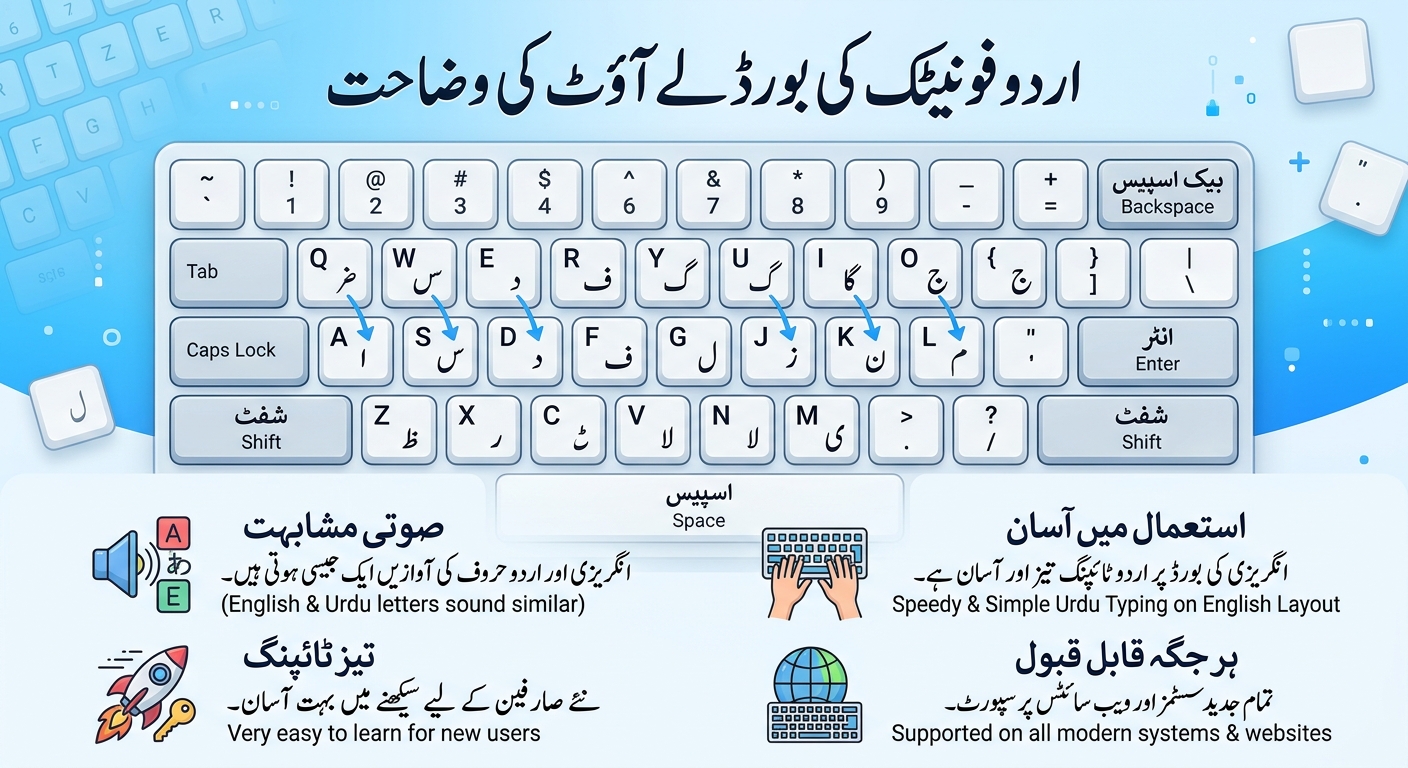
If you have ever looked at an Urdu keyboard and wondered where on earth the ٹ or the ں is hiding, this guide is for you. Below is every key of the phonetic layout used by our Online Urdu Keyboard: the plain letters, the Shift letters, the vowel marks and the punctuation, with practice words you can try as you read.
This is an InPage-style phonetic layout. Phonetic means each English key gives you the Urdu letter that sounds closest to it, so you do not have to memorise a brand new keyboard. A few letters are in surprising places, though, and that is exactly what the charts below are for. ToolsVexa is not connected to InPage or its owner, and other phonetic keyboards may put a few of the rarer marks on different keys.
The one rule to remember
You type the letters that are in the Urdu spelling, not the English one. Pakistan is typed pakstan, which gives پاکستان. Urdu is typed ardw, which gives اردو. If a word comes out wrong, say its Urdu spelling out letter by letter and type those letters.
The basic letters (no Shift)
| English key | Urdu letter | Name |
| a | ا | alif |
| b | ب | bay |
| c | چ | chay |
| d | د | dal |
| e | ع | ain |
| f | ف | fay |
| g | گ | gaf |
| h | ھ | do-chashmi hay |
| i | ی | choti yay |
| j | ج | jeem |
| k | ک | kaf |
| l | ل | lam |
| m | م | meem |
| n | ن | noon |
| o | ہ | choti hay |
| p | پ | pay |
| q | ق | qaf |
| r | ر | ray |
| s | س | seen |
| t | ت | tay |
| u | ء | hamza |
| v | ط | toy |
| w | و | wao |
| x | ش | sheen |
| y | ے | bari yay |
| z | ز | zay |
Two of these catch people out. The h key gives ھ, the do-chashmi hay, and the ordinary ہ is on the o key. And the long ے is on y, while the short ی is on i.
The Shift letters
The extra Urdu letters, the ones English has no sound for, live on the Shift layer. Hold Shift and press the key.
| Shift + key | Urdu letter | Name |
| T | ٹ | ttay |
| D | ڈ | ddal |
| R | ڑ | rray |
| N | ں | noon ghunna |
| S | ص | suad |
| J | ض | zuad |
| Z | ذ | zal |
| X | ژ | zhay |
| C | ث | say |
| V | ظ | zoy |
| K | خ | khay |
| G | غ | ghain |
| H | ح | bari hay |
| O | ۃ | gol hay |
| 4 | ئ | yay with hamza |
| 6 | ۓ | bari yay with hamza |
| = | آ | alif madd |
The plain - key gives أ and the plain = key gives ؤ. If you want a normal hyphen, use Shift and -.
Vowel marks and other signs
These marks sit above or below a letter, so type the letter first and then the mark.
| Shift + key | Mark | Name |
| F | ◌َ | zabar |
| I | ◌ِ | zer |
| P | ◌ُ | pesh |
| Q | ◌ّ | shadda (tashdeed) |
| B | ◌ْ | jazm |
| M | ◌ً | do zabar |
| , | ◌ٍ | do zer |
| L | ◌ٌ | do pesh |
| U | ◌ٰ | khari zabar |
| A | ◌ٓ | madd mark |
| E | ◌ٔ | hamza mark |
| Y | ـ | kashida (stretch) |
| W | ﷺ | salawat sign |
For example, کِتاب is k, Shift i, t, a, b. And پکّا is p, k, Shift q, a.
Numbers and punctuation
The number keys type Urdu digits (۱۲۳) by default. If you would rather have 123, untick the Urdu digits box under the keyboard.
| English key | You get | Name |
| , | ، | Urdu comma |
| . | ۔ | Urdu full stop |
| ; | ؛ | Urdu semicolon |
| Shift + / | ؟ | Urdu question mark |
| ' | . | normal full stop |
| Shift + - | - | hyphen |
Practice words
Try these on the keyboard. Each one is typed exactly as shown, and the keys in the second column are in order.
| Word | What to type |
| اردو | a, r, d, w |
| پاکستان | p, a, k, s, t, a, n |
| علی | e, l, i |
| کتاب | k, t, a, b |
| پانی | p, a, n, i |
| کیا | k, i, a |
| ہے | o, y |
| اللہ | a, l, l, o |
| میں | m, i, Shift n |
| ٹماٹر | Shift t, m, a, Shift t, r |
| ڈاکٹر | Shift d, a, k, Shift t, r |
| آپ | Shift =, p |
| بھائی | b, h, a, Shift 4, i |
| جنوری | j, n, w, r, i |
| کِتاب | k, Shift i, t, a, b |
| پکّا | p, k, Shift q, a |
Easy mix-ups to watch for
- ہ and ھ: o gives ہ, h gives ھ.
- ی and ے: i gives the short ی, y gives the long ے.
- ن and ں: n gives ن, Shift n gives ں.
- ء and ئ: u gives ء, Shift 4 gives ئ.
- ا and آ: a gives ا, Shift = gives آ.
- ت and ٹ, د and ڈ, ر and ڑ: the plain letter is the normal key, the heavy one is Shift and the same key.
Tips for learning the layout faster
- Tick the box to type Urdu with your computer keyboard and watch the on-screen keys light up as you type. The small English letter on each key tells you which key it is, and holding Shift shows the second letter.
- Learn it in small steps. The basic letters cover most words, and you can add the Shift letters one at a time as you meet them.
- Keep this chart open in another tab while you practise. After a day or two you will not need it.
- When you are done, press Copy and paste the text into WhatsApp, Word, Facebook or an email. If you want the classic look, switch the font to Nastaliq.
New to all of this? Our guide to Urdu typing online on a PC and a phone shows the three easiest ways to get started.
Ready to try it? Open the Online Urdu Keyboard and type the first word from the table above.
Layouts for Urdu phonetic typing differ a little from one program to another, mainly on the rarer marks. This chart describes the layout of the ToolsVexa keyboard. Last updated November 2026.